
As of 2026-07-17 this project is archived and read-only. No further releases, issues, or pull requests will be accepted.
PANTHEON.tech provides custom services on top of SONiC and FD.io. Please contact us for more details.
Welcome back to our Vector Packet Processing implementation guide, Part 4.
Today, we will go through the essentials of gRPC and REST and introduce their core concepts, while introducing one missing functionality into our VPP build. This part will also introduce the open-source GoVPP, Go language bindings for binary API – VPP management.
Since the original version of this article, the surrounding ecosystem has changed in three notable ways: GoVPP moved out of
git.fd.io/govpp.gitand is now developed atgithub.com/FDio/govpp(import pathgo.fd.io/govpp); gRPC-Gateway is now atv2; and GoVPP itself can now generate HTTP handlers natively from.api.jsonfiles via the-gen=httpflag, which removes a large part of the custom code-generation step described below. The internal VPP-RPC demonstration tool referenced in the original post has since been superseded by Pantheon's productized solution, StoneWork, which exposes a single VPP data plane over both gRPC (default port 9111) and REST (default port 9191) out of the box. The conceptual walk-through below has been preserved, with inline updates where the toolchain has moved on.
The Issue
Natively, VPP does not include a gRPC / RESTful interface against its full binary API. PANTHEON.tech developed an internal solution, which utilizes a gRPC-gateway to VPP, using GoVPP. It is called VPP-RPC, through which you can connect to VPP using a REST client.
In case you are interested in this solution, please contact us via our website.
Introduction
First and foremost, here are the terms that you will come across in this guide:
- gRPC (Remote Procedure Calls) is a remote procedure call (RPC) system initially developed by Google. It uses HTTP/2 for transport, Protocol Buffers as the interface description language, and provides features such as authentication, bidirectional streaming and flow control, blocking or non-blocking bindings, and cancellation and timeouts. It generates cross-platform client and server bindings for many programming languages.
- gRPC-Gateway (grpc-ecosystem/grpc-gateway, now at v2) is a plugin of protobuf. It reads the gRPC service definition and generates a reverse-proxy server which translates a RESTful JSON API into gRPC. This server is generated according to
google.api.httpannotations in your gRPC definition. - VPP Agent is a set of VPP-specific plugins, built on top of Ligato's CN-Infra framework, that exposes VPP functionality to client apps over a higher-level, model-driven API. Northbound, the VPP Agent already speaks REST and gRPC – so for many use-cases the question "how do I get a REST/gRPC interface to VPP?" is answered just by deploying the VPP Agent in front of it.
- VPP-RPC is our internal RESTful VPP service. It utilizes gRPC & gRPC-gateway as 2 separate processes, in order to facilitate communication with VPP through GoVPP.
JSON message sequence
The gRPC gateway exposes the REST service, for which there is no built-in support in VPP itself. By using gRPC-gateway and gRPC server services, the VPP API is available through gRPC and REST at the same time. Both services use generated models from VPP binary APIs, therefore exposing both APIs is easy enough to include both. It is up to the user to choose, which mechanism they will use.
When exchanging data between a browser and a server, the data can only be text. Any JavaScript object can be converted into JSON and sent to the server. This allows us to process data as JavaScript objects, while avoiding complicated translations and parsing issues.
The sequence diagram below describes the path the original JSON message takes in our solution:
- The Client sends an HTTP request to gRPC-Gateway
- gRPC-Gateway transforms the JSON into a protobuf message & sends it to the gRPC server
- Each RPC has a Go method handling its logic. For unary RPCs, this simply means copying the protobuf message into the corresponding VPP message structure and passing it to GoVPP's binary API
- GoVPP eventually passes the message to the underlying VPP binary API (over
/run/vpp/api.sock), where the desired functionality is executed
VPP API build process
The figure below describes the build process for a single VPP API. Let's see what needs to happen for a tap API:
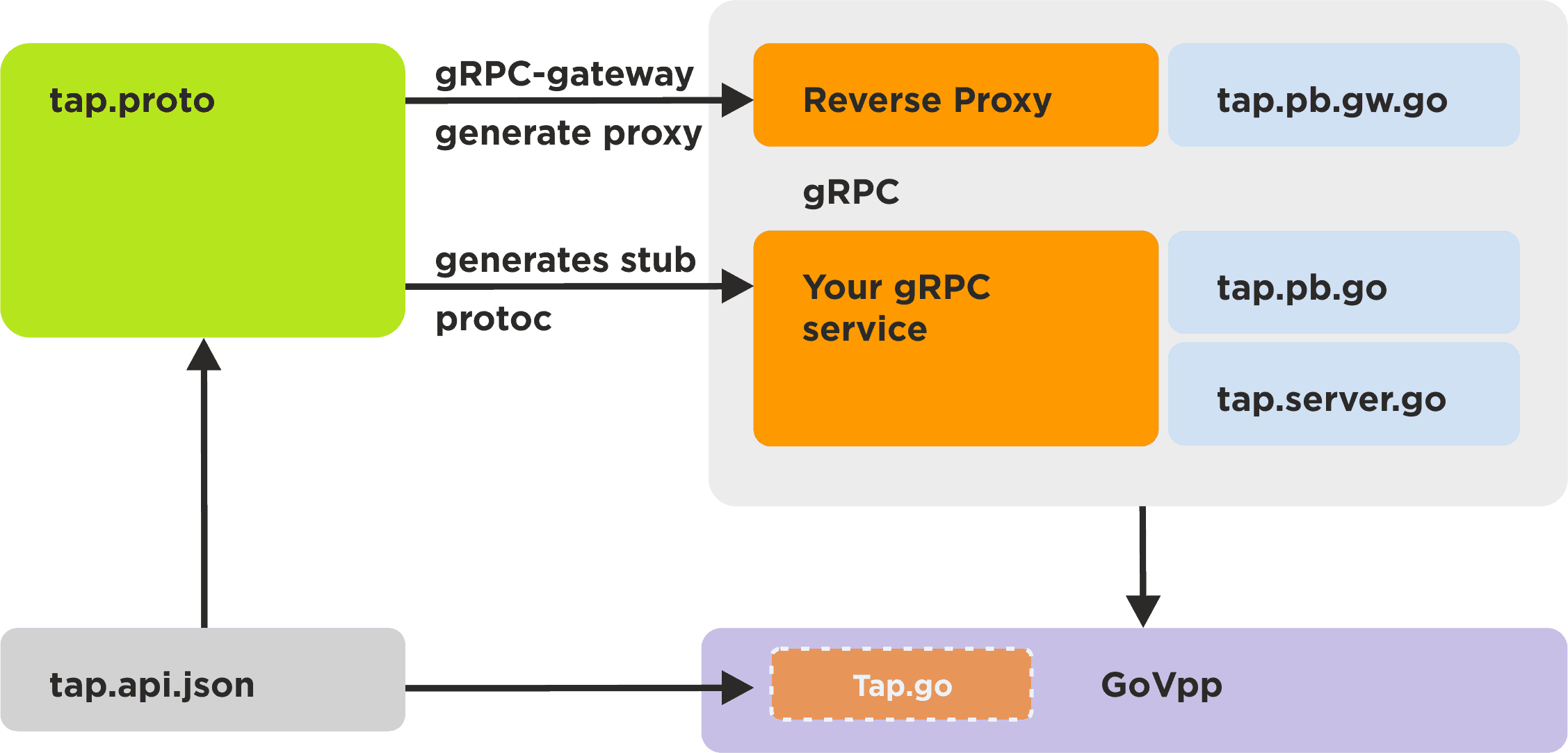
VPP APIs are defined in /usr/share/vpp/api/ which is accessible after installing VPP. Each API module produces a corresponding *.api.json file (e.g. tap.api.json).
This file will drive the creation of all 3 building blocks:
- GoVPP's
binapi-generatorgenerates the filetap.ba.go(the message definitions). With the-gen=rpcplugin (default) it also producestap_rpc.ba.gowith a typed RPC service client. vpp-rpc-protogengeneratestap.proto, which contains the gRPC messages and services, including the URL for each RPC.protoc's Go plugin compiles the proto file and creates a gRPC stubtap.pb.go, containing client & server interfaces that define RPC methods and protobuf message structs.vpp-rpc-implementorgenerates the code that implements theTapServerinterface – the actual RPC methods calling GoVPP APIs – intap.server.go.protoc's gRPC-Gateway plugin compiles the proto file and creates the reverse proxytap.pb.gw.go. We don't have to touch this file further.
2026 update - much of step 2 onwards is now built into GoVPP. Running
binapi-generator -gen=http,rpcagainst a VPP.api.jsonfile will produce HTTP handler files alongside the RPC client, removing the need for the customvpp-rpc-protogenandvpp-rpc-implementorsteps for plain HTTP exposure. See the GoVPP user guide for the current generator flags. The custom protoc + gRPC-Gateway pipeline is still the right choice when you need full RESTful semantics withgoogle.api.httppath templates, OpenAPI documents, and a separate reverse-proxy process – which is exactly what StoneWork does.
Running the examples
To run all the above, we need to make sure all these processes are running:
- VPP service
- gRPC server (needs root privileges)
sudo vpp-rpc-server - gRPC gateway
vpp-rpc-gateway
Running a simple request using Curl
If we want to invoke the API we have created, we can use Curl. Vpe will require a URL (vpe/showversion/request), which will map the above-mentioned API to VPP's binary API. We will now use Curl to POST a request to a default address of localhost:8080:
curl -H "Content-Type: application/json" -X POST 127.0.0.1:8080/Vpe/ShowVersion/request --silent

{"Retval":0,"Program":"dnBlAAAAAAAAAAAAAAAAAAAAAAAAAAAAAAAAAAAAAAA=","Version":"MTguMDctcmMwfjEyOC1nNmYxYzQ4ZAAAAAAAAAAAAAA=",
"BuildDate":"xaB0IG3DoWogIDMgMTQ6MTA6NTQgQ0VTVCAyMDE4AAA=",
"BuildDirectory":"L2hvbWUvcGFsby92cHA"}
The decoded reply says:
{
    "Retval": 0,
    "Program": "vpe",
    "Version": "18.07-rc0~128-g6f1c48d",
    "BuildDate": "Thu May  3 14:10:54 CEST 2018",
    "BuildDirectory": "/home/user/vpp"
}
The version string above (
18.07-rc0~128-g6f1c48d) is from the original 2019 capture. As of late 2025, the current stable release is VPP 25.10. The shape of the reply is unchanged, only the values move.
Postman collection
We provide a Postman collection within our service, which serves as a starting point for users with our solution. The collection created in the vpp-rpc repository, tests/vpp-rpc.postman_collection.json path, contains various requests and subsequent tests to the Tap module.
Performance analysis in Curl
Curl can give us detailed timing analysis of a request's performance. If we run the previous request 100 times, the summary times (in milliseconds) we get usually are:
mean=4.82364000000000000
min=1.047
max=23.070
average rr per_sec=207.31232015656226418223
average rr per_min=12438.73920939373585093414
average rr per_hour=746324.35256362415105604895
Judging from the graph below, we see that most of the requests take well below the average mark. Profiling our solution, we found the reason for the anomalies (above 10 ms) to be GoVPP itself when waiting on the reply from VPP. This behavior is well documented on the GoVPP wiki. We can conclude our solution closely mirrors the performance of the synchronous GoVPP APIs.
Here is the unary RPC total time in ms:
In conclusion, we have introduced ourselves to the concepts of gRPC and have run our VPP API + GoVPP build, with a REST service feature. Furthermore, we have shown you our in-house solution VPP-RPC, which facilitates the connection between the API and GoVPP.
If you would like to inquire about a custom integration, please contact us for more information.
You can contact us at https://pantheon.tech/
Explore our Pantheon GitHub. Follow us on LinkedIn.
Watch our YouTube Channel.

![[Case Study] Upgrading a global telecom leader’s SDN platform](https://pantheontech1.b-cdn.net/wp-content/uploads/2026/07/sdn_usecase.jpg)
![[Case Study] High-performance Golang and VPP integration for Cloud-Native firewalls](https://pantheontech1.b-cdn.net/wp-content/uploads/2026/07/govpp_firewall.jpg)
![[Case Study] From R&D prototype to global commercial success](https://pantheontech1.b-cdn.net/wp-content/uploads/2026/07/rd_to_success.jpg)